
AI Customer Service for Small Business — Faster Support Without Losing the Human Touch
The biggest fear small business owners have about AI customer service for small business is losing what makes them different: the personal touch. You’re not a faceless corporation. You know your customers by name. You remember their preferences. Handing that relationship to a chatbot feels like a betrayal.
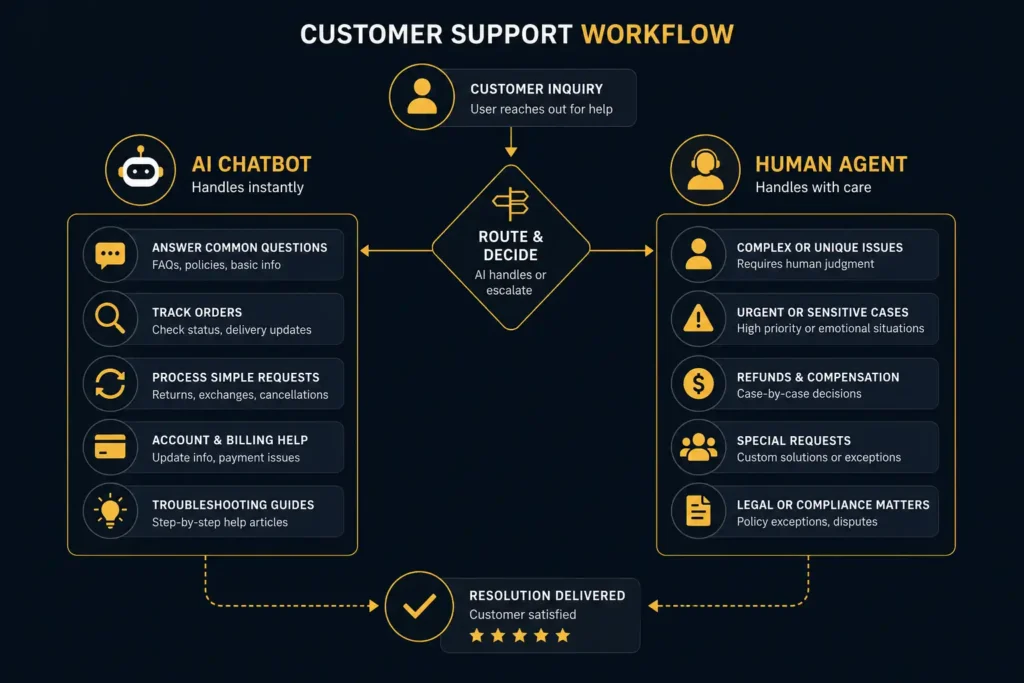
But here’s the reality most small business owners don’t see: AI customer service for small business isn’t about replacing your personal attention — it’s about protecting it. By letting AI handle the repetitive 80% (order status, appointment confirmations, FAQ answers, after-hours inquiries), you free yourself to give the genuinely personal attention that the other 20% demands.
The result? Customers get faster responses around the clock, and you spend your human energy on the conversations that actually matter. Let’s break down exactly how to make this work.
Why AI Customer Service for Small Business Matters in 2026
Customer expectations have shifted permanently. A HubSpot survey found that 90% of customers rate an “immediate” response as important or very important when they have a customer service question — and “immediate” means under 10 minutes.
For a small business owner who’s also the salesperson, the bookkeeper, and the operations manager, responding to every inquiry in under 10 minutes is physically impossible. You’re either on a job site, in a meeting, or sleeping. Messages pile up. Response times stretch to hours — or days.
This is where AI customer service for small business fills a critical gap. AI doesn’t sleep, doesn’t take lunch breaks, and doesn’t get overwhelmed during your busiest season. It handles the routine instantly so you can handle the complex personally.
The numbers support the investment:
- Businesses that respond within 5 minutes are 21x more likely to qualify a lead than those responding after 30 minutes
- 67% of customer churn is preventable if the issue is resolved during the first interaction
- AI chatbots can resolve 60-80% of common customer inquiries without human intervention
What AI Customer Service Actually Handles (and What It Shouldn’t)
The key to successful AI customer service for small business is knowing what to automate and what to keep human. Here’s the dividing line:
Let AI Handle These (The Repetitive 80%)
- Business hours, location, and directions — the #1 most common inquiry for local businesses
- Order and appointment status — “Where’s my order?” and “What time is my appointment?” account for 30-40% of all customer messages
- FAQ answers — pricing information, service area, payment methods, return policies
- After-hours acknowledgment — “We received your message and will respond by 9 AM tomorrow”
- Appointment booking and rescheduling — direct customers to your scheduling system
- Review and feedback collection — automated follow-up after service completion
Keep These Human
- Complaints and escalations — frustrated customers need empathy, not algorithms
- Complex quotes and custom work — these require judgment and relationship-building
- High-value client communication — your top 20% of clients deserve direct access
- Sensitive situations — refund disputes, service failures, personal matters
AI Chatbots That Don’t Sound Like Robots
The chatbots of 2020 were painful — rigid scripts, limited understanding, and responses that screamed “you’re talking to a machine.” The chatbots of 2026 are different. Powered by large language models, modern AI chatbots understand context, handle follow-up questions, and can be trained to match your brand voice.
How to Make Your Chatbot Sound Like You
The secret to chatbot personality is in the training data. Instead of using generic responses, feed your chatbot:
- Your actual customer emails and replies — the way you naturally respond to questions becomes the chatbot’s template
- Your FAQ page content — written in your voice, not corporate boilerplate
- Brand guidelines — casual or formal? First name basis or Mr./Ms.? Emoji-friendly or strictly professional?
- Specific instructions — “If asked about pricing, always mention the free consultation first” or “Never promise same-day service unless it’s a water emergency”
The best AI customer service for small business chatbots include a seamless handoff mechanism. When a question exceeds the chatbot’s knowledge or the customer expresses frustration, it should say something like: “Great question — let me connect you with [owner name] who can give you the best answer. They’ll follow up within [timeframe].”
Chatbot Quick-Start: Tidio Setup (30 Minutes)
Tidio is one of the most small-business-friendly chatbot platforms available. Here’s a quick setup:
- Sign up for free at tidio.com and install the widget on your website
- Go to Chatbots → Create New → choose the “Answer Questions” template
- Add your 10 most common customer questions and your typical answers
- Set business hours so the chatbot knows when to say “I’ll have someone follow up” vs. “Let me check with the team right now”
- Enable the Lyro AI feature to handle questions beyond your predefined list
- Test it yourself by opening your website in an incognito window
Smart Auto-Responses That Feel Personal
Auto-responses get a bad reputation because most of them are terrible. “Thank you for contacting us. Your message is important to us. We will respond within 24-48 business hours.” That message tells the customer nothing and demonstrates zero personality.
Smart AI customer service for small business uses auto-responses that actually help:
After-Hours Auto-Response Template
“Hey [First Name] — thanks for reaching out! We’re closed for the evening but I’ll personally review your message first thing tomorrow morning (usually by 8:30 AM). If this is urgent [for HVAC: and you have no heat/AC], call our emergency line at [number]. Talk soon! — [Owner Name]”
New Inquiry Auto-Response Template
“Hi [First Name]! Got your message about [topic]. I’m pulling together some options for you and will follow up within 2 hours. In the meantime, here’s our [pricing guide / FAQ page / portfolio] in case it’s helpful: [link]. — [Owner Name]”
Notice the pattern: use the customer’s name, acknowledge their specific inquiry, set a concrete response time, provide something useful immediately, and sign with a real name. This is light-years better than generic corporate auto-replies.
AI Ticket Routing and Prioritization
Once you start getting more than 20-30 customer inquiries per day, the challenge isn’t just responding — it’s responding to the right messages first. AI ticket routing solves this by automatically categorizing and prioritizing incoming messages.
Here’s how AI customer service for small business prioritization typically works:
- Urgent (respond within 1 hour): Service failures, complaints, billing disputes, time-sensitive requests
- High (respond within 4 hours): New quote requests, scheduling changes, product questions from existing customers
- Normal (respond within 24 hours): General inquiries, information requests, feedback
- Low (respond within 48 hours): Newsletter replies, social media mentions, vendor outreach
Tools like Front ($19/mo), Help Scout ($22/mo), and Freshdesk (free tier available) all offer AI-powered ticket routing that learns your priorities over time.
Sentiment Analysis: Catching Frustrated Customers Before They Leave
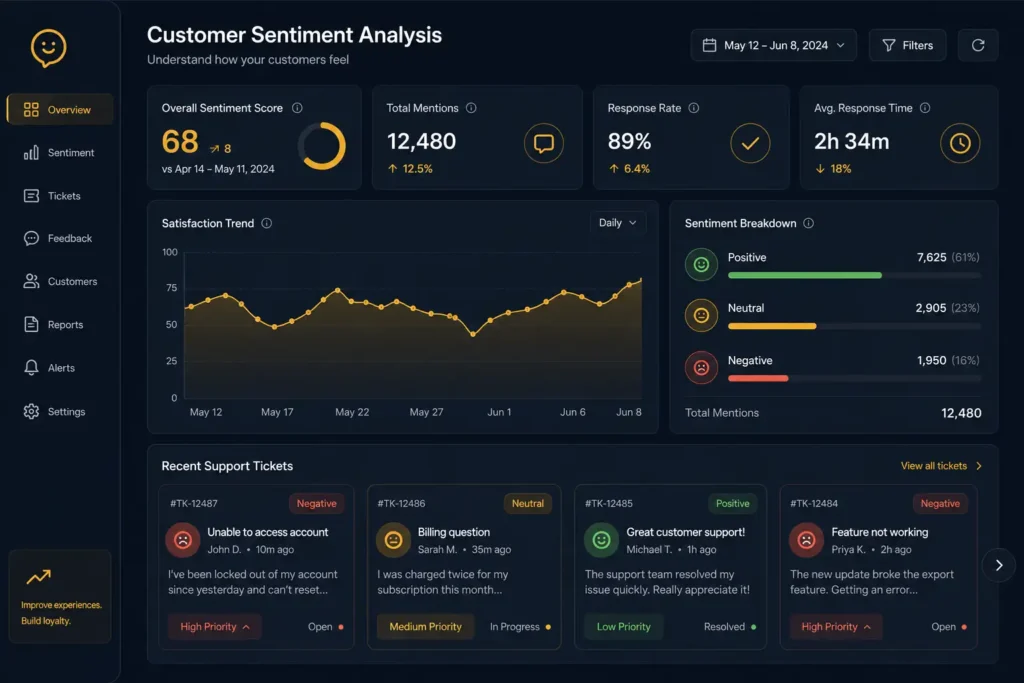
One of the most powerful — and underused — applications of AI customer service for small business is sentiment analysis. This feature reads the emotional tone of incoming messages and flags ones that indicate frustration, anger, or disappointment.
Instead of treating all messages equally, sentiment analysis lets you:
- Prioritize frustrated customers who might leave a negative review if ignored
- Identify patterns — if 5 customers complain about the same thing in one week, you have a systemic issue to fix
- Trigger escalation workflows — a message flagged as “angry” skips the chatbot and goes directly to you
- Track satisfaction trends over time without sending survey forms that nobody fills out
This doesn’t require an enterprise budget. Even basic tools like Freshdesk and Zendesk include sentiment scoring in their standard plans.
How to Use Sentiment Data Strategically
Beyond individual customer rescue, sentiment data helps you improve your entire operation. Review your sentiment reports monthly and look for these patterns:
- Recurring complaint themes — if “wait time” appears in 15% of negative messages, your scheduling system needs attention, not your customer service script
- Seasonal frustration spikes — many service businesses see negativity increase during peak season when response times naturally slow down. Plan extra support capacity before those periods
- Post-purchase sentiment — if customers are positive before purchase but negative after, you have a delivery or onboarding problem, not a sales problem
- Channel differences — customers who contact you via social media may have different sentiment patterns than email customers. Tailor your AI responses per channel
The businesses that treat AI customer service for small business as a data source — not just a labor saver — consistently outperform competitors who only use AI to deflect tickets.
AI Customer Service for Small Business — Best Tools in 2026
Here are the top tools ranked by value for small businesses with 1-20 employees:
| Tool | Best For | Price | Key AI Feature |
|---|---|---|---|
| Tidio | Website chat + AI chatbot | Free – $29/mo | Lyro AI responds to questions using your content |
| Freshdesk | Multi-channel support | Free – $49/mo | AI ticket routing, sentiment analysis, auto-categorization |
| Help Scout | Email-based support | $22/user/mo | AI drafts replies, summarizes threads, suggests responses |
| Front | Team inbox management | $19/user/mo | AI tagging, priority sorting, response suggestions |
| Intercom | Sales + support combo | $39/mo | Fin AI agent resolves 50%+ of inquiries autonomously |
| ManyChat | Social media messaging | Free – $15/mo | AI-powered DM automation for Instagram, Facebook, WhatsApp |
Budget pick: Tidio’s free plan handles most solo operators. Upgrade to Freshdesk when you have a team.
Best value: Help Scout if most of your support is email-based. Front if you need shared inbox for a team.
For businesses exploring AI tools across all departments — not just customer service — our AI stack guide for small agencies covers the complete toolkit.
How to Set Up AI Customer Service in One Weekend
You don’t need a month-long implementation. Here’s a weekend plan to get AI customer service for small business running:
Saturday Morning (2 hours)
- List your top 20 customer questions. Check your email, social media DMs, and Google Business Profile Q&A. Write down the actual questions customers ask, word for word.
- Write your answers. Not corporate-speak — write the way you’d actually respond in a text message to a customer you know. Keep answers under 3 sentences each.
- Choose your chatbot tool. For most small businesses, start with Tidio (free) or ManyChat (if your volume comes through Instagram/Facebook).
Saturday Afternoon (2 hours)
- Set up the chatbot. Install the widget, add your Q&A pairs, configure business hours, and write your after-hours message.
- Configure auto-responses. Set up the two smart auto-response templates from earlier in this article for email and contact form submissions.
- Test everything. Open your website in incognito mode and ask questions. Have a friend test it. Fix anything that sounds robotic or unhelpful.
Sunday (1 hour)
- Set up escalation rules. Define what triggers a handoff to you — keywords like “speak to a person,” “complaint,” “cancel,” or “urgent.”
- Configure notifications. Make sure escalated conversations send you an immediate text or push notification.
- Go live. Turn on the chatbot and monitor it closely for the first week. Review every conversation daily to catch gaps in the Q&A knowledge base.
For a broader AI setup plan that includes customer service alongside marketing, admin, and operations, see our 90-day AI automation roadmap.
Common Mistakes to Avoid
Based on hundreds of small businesses implementing AI customer service, here are the mistakes that cause the most damage:
- Hiding the “talk to a human” option. If customers can’t reach a real person when they need one, they’ll leave. Always make the escalation path obvious and easy.
- Setting unrealistic expectations. If your chatbot says “someone will respond in 5 minutes” and nobody does for 3 hours, you’ve made things worse than having no chatbot at all.
- Using generic, corporate language. Your chatbot should sound like your business, not like a Fortune 500 call center. Use your name, your tone, your personality.
- Automating complaints. Never let a chatbot handle an angry customer unsupervised. Flag negative sentiment for immediate human follow-up.
- Not reviewing chatbot conversations. Spend 15 minutes daily for the first two weeks reading every AI conversation. You’ll find gaps, improve responses, and spot patterns you’d otherwise miss.

The Bottom Line
AI customer service for small business isn’t about removing the human element — it’s about deploying it strategically. Let AI handle the questions that have a single correct answer (business hours, order status, pricing, appointment booking), and reserve your personal attention for the conversations that build loyalty and close deals.
The businesses that get this right don’t just save time. They actually improve customer satisfaction because response times drop from hours to seconds, inquiries never fall through the cracks, and the owner has more energy for the interactions that truly matter.
Start small. Set up a chatbot this weekend. Automate your three most common questions. Then expand from there. If you’re looking for the exact prompts and templates to train your AI customer service for small business tools, our prompt library has ready-to-use scripts.
For a broader look at how AI handles admin work beyond customer service — including invoicing, scheduling, and expense tracking — read our guide on AI admin tasks that save 15+ hours a week.
Want ready-to-use prompt templates for customer communication, follow-ups, and more? The AI Profit Mastery Bundle includes 50+ business prompt templates — including customer service scripts, email templates, and response frameworks — all for $27.