
5 AI Admin Tasks That Save Small Businesses 15+ Hours a Week
If you run a small business, you already know the frustration: half your week disappears into AI admin tasks that should take minutes but somehow eat hours. Invoicing, scheduling, email triage, data entry, expense tracking — none of it generates revenue, yet all of it demands your attention.
Here’s the good news. In 2026, AI admin tasks that once required a full-time assistant can now run on autopilot for less than $100 a month. The tools are affordable, the setup is fast, and the payoff is immediate — we’re talking 15+ hours recovered every single week.
This guide breaks down the five highest-impact AI admin tasks for small businesses, the specific tools that handle each one, and a step-by-step plan to get everything running in under a week. No coding required. No IT team needed.
Why AI Admin Tasks Matter More Than Ever
According to a 2024 McKinsey report, administrative work accounts for roughly 60-70% of all activities that could be automated with current AI technology. For small business owners specifically, that translates to 16+ hours per week spent on tasks a $30/month tool can handle.
The math is brutal. At even a conservative $50/hour value for your time, those 16 hours cost you $800 per week — or $41,600 per year. That’s not a line item on your P&L, but it’s real money you’re leaving on the table every time you manually type an invoice or sort through your inbox.
What’s changed in 2026 is that AI admin tasks have become genuinely reliable. Two years ago, AI tools made mistakes often enough that you spent almost as much time checking their work as doing it yourself. Today’s tools — especially for structured, repeatable admin work — operate at 95%+ accuracy out of the box and improve as they learn your patterns.
Let’s look at the five AI admin tasks that deliver the biggest return for the smallest investment.
Task 1: AI-Powered Invoicing and Payment Follow-Ups
The Problem
Creating invoices manually, tracking who has paid, and chasing late payments is tedious and uncomfortable. Most small business owners either spend hours on it weekly or let revenue slip through the cracks. A QuickBooks study found that 64% of small businesses deal with invoices that are paid more than 30 days late — and the #1 reason is inconsistent follow-up.
How AI Handles It
AI-powered invoicing tools auto-generate invoices from job completions, send payment reminders on a schedule you set, and flag overdue accounts before they snowball. This is one of the easiest AI admin tasks to set up because the workflow is straightforward: job done → invoice sent → reminders triggered → payment received.
Tools to try:
- QuickBooks Online ($30/mo) — AI auto-categorizes expenses, generates invoices from estimates, sends smart payment reminders that adjust timing based on customer behavior
- FreshBooks ($17/mo) — automated recurring invoices, late payment reminders, time-to-invoice tracking with AI insights
- Wave (Free) — AI-assisted invoicing with automatic payment matching, ideal for businesses under $500K revenue
Time saved: 3-4 hours per week
Real example: A landscaping company in Texas set up QuickBooks’ auto-invoicing after every completed job. Their average time-to-payment dropped from 18 days to 6 days, and they recovered $4,200 in invoices they’d previously forgotten to send.
Task 2: AI Email Sorting and Response Drafting
The Problem
The average small business owner receives 80-120 emails daily. Sorting through them, identifying what’s urgent, and crafting responses devours your morning before the real work starts. By the time you surface from your inbox, half the day is gone.
How AI Handles It
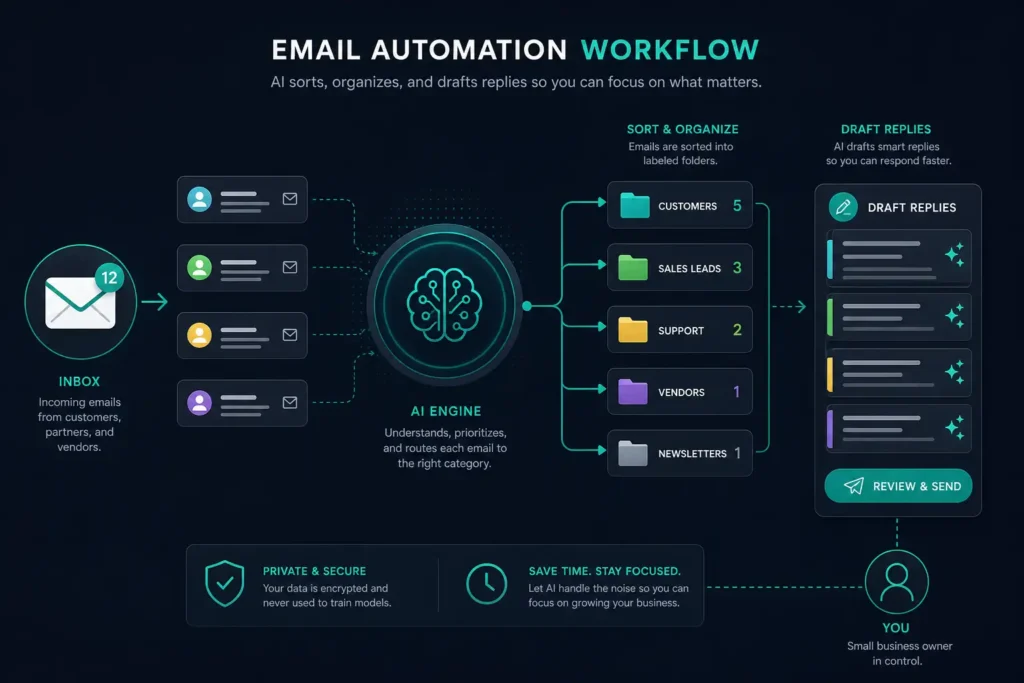
AI email tools categorize incoming messages by priority, draft responses in your tone, and flag messages that need personal attention — while auto-handling the rest. Among all AI admin tasks, email automation is the one most business owners notice immediately because the time savings hit from day one.
Tools to try:
- Gmail + Gemini (included with Google Workspace, $14/mo) — AI summarizes long threads, drafts contextual replies, prioritizes your inbox based on sender importance and content urgency
- Microsoft Copilot for Outlook ($30/user/mo) — drafts emails from bullet points, summarizes threads, suggests follow-ups, and integrates with your Teams calendar
- SaneBox ($7/mo) — AI inbox filtering that learns your priorities over time and moves non-essential emails to a digest
Time saved: 2-3 hours per week
Quick Setup: Gmail AI Responses (15 Minutes)
- Open Gmail → Settings → Enable “Smart Compose” and “Smart Reply”
- For longer responses, click the Gemini icon in the compose window → describe what you want to say in plain language
- Review the AI draft, adjust tone if needed, and hit send
- Over time, Gemini learns your writing style and gets more accurate with each email
Pro tip: Create three Gmail labels — “Respond Today,” “This Week,” and “FYI Only.” Use filters to auto-sort incoming mail. Then let AI draft responses for the “Respond Today” pile first. This single habit cuts email time by 40%.
Task 3: AI Scheduling and Calendar Management
The Problem
The back-and-forth of scheduling — “Does Tuesday at 2 work? No? How about Thursday?” — wastes time for you and frustrates customers. Double-bookings, no-shows, and forgotten appointments cost real money, especially for service businesses where every missed slot is lost revenue.
How AI Handles It
AI scheduling eliminates the ping-pong entirely. Customers book directly into your availability, get automatic reminders, and the system handles rescheduling without your involvement. Modern AI scheduling tools also optimize your calendar by grouping similar appointments, protecting focus time, and predicting no-show risk.
Tools to try:
- Calendly ($12/mo) — AI-optimized scheduling with buffer times, round-robin team assignment, and automatic timezone detection
- Acuity Scheduling ($20/mo) — intake forms, payment collection at booking, smart availability rules that prevent overbooking
- Cal.com (Free tier available) — open-source scheduling with AI routing, workflow automations, and no per-seat pricing
Time saved: 3-5 hours per week
No-show killer: Set up automatic SMS reminders at 24 hours and 2 hours before every appointment. This alone cuts no-shows by 30-40% for most service businesses. Calendly and Acuity both include this feature in their paid plans.
If you serve local customers — plumbers, HVAC techs, electricians — our guide to AI scheduling for plumbers dives deeper into dispatch-specific automation that goes beyond basic calendar booking.
Task 4: AI Data Entry and Document Processing
The Problem
Manually entering receipts, copying information between systems, and updating spreadsheets is error-prone, mind-numbing, and one of the biggest hidden time sinks in any small business. It’s also the task most likely to fall behind when things get busy — creating a backlog that takes even longer to clear.
How AI Handles It
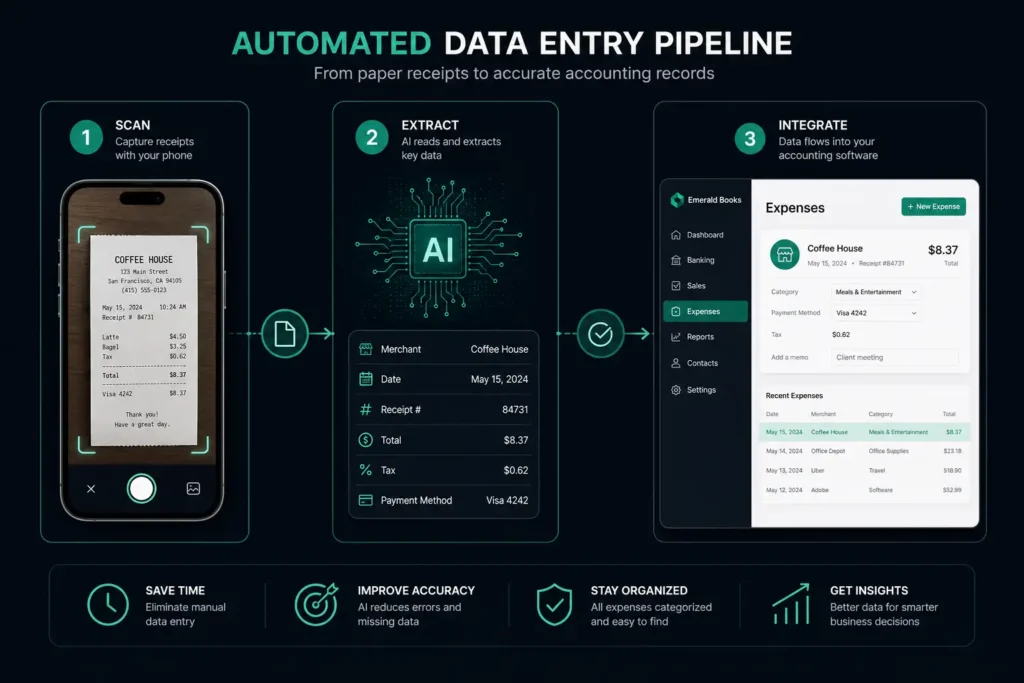
AI now reads receipts, invoices, and documents automatically. It extracts the data, categorizes it, and pushes it into your accounting or CRM system without you touching a keyboard. This category of AI admin tasks has seen the biggest improvement in 2025-2026 thanks to better optical character recognition (OCR) and large language models that understand document context.
Tools to try:
- Dext (formerly Receipt Bank) ($24/mo) — photograph receipts with your phone, AI extracts vendor, amount, date, and category, then syncs to your accounting software
- Zapier ($20/mo) — connects 6,000+ apps and auto-transfers data between them with AI-powered formatting and error handling
- Parseur ($39/mo) — AI document parser that extracts structured data from emails, PDFs, and web forms into spreadsheets or your CRM
Time saved: 4-6 hours per week
The Zapier Automation Every Small Business Should Set Up First
Here’s a simple automation that saves most businesses 2+ hours per week and takes 20 minutes to configure:
- Trigger: New form submission on your website (contact form, quote request, booking inquiry)
- Action 1: Add the contact to your CRM with all form fields mapped automatically
- Action 2: Send a personalized welcome email using a template you write once
- Action 3: Create a follow-up task in your project management tool (Asana, Trello, Monday.com)
- Action 4: Notify you via Slack, text, or email so you know a lead came in
Set it up once. It runs forever. Zero data entry required. If you want to see how this fits into a broader automation strategy, check out our 90-day automation roadmap.
Task 5: AI Expense Tracking and Financial Reporting
The Problem
Shoebox full of receipts. Bank statements you haven’t reconciled since last quarter. A vague sense that you’re spending too much on something but no time to figure out what. Sound familiar?
Poor expense tracking doesn’t just waste time — it costs money directly. Uncategorized expenses mean missed tax deductions. Unmonitored subscriptions mean you’re paying for tools nobody uses. Delayed reconciliation means cash flow surprises.
How AI Handles It
AI expense tracking runs continuously in the background. It categorizes every transaction, spots unusual spending patterns, generates reports automatically, and even predicts cash flow issues before they hit. Of all the AI admin tasks on this list, expense tracking offers the most compounding value because the insights improve as more data accumulates.
Tools to try:
- QuickBooks Online ($30/mo) — AI auto-categorizes bank transactions with 95%+ accuracy after a two-week learning period, flags anomalies, generates P&L and cash flow reports on demand
- Bench ($299/mo) — AI-assisted bookkeeping with human review, monthly financial reports delivered automatically, ideal for businesses that want hands-off finances
- Fathom ($39/mo) — AI financial analysis that transforms your QuickBooks or Xero data into visual dashboards, trend analysis, and cash flow forecasts
Time saved: 4-5 hours per week
Important: Don’t skip the review step during month one. AI categorization is 90-95% accurate out of the box. Spend 15 minutes weekly reviewing AI-categorized transactions for the first four weeks. After that, accuracy typically climbs above 98% and you can shift to monthly spot-checks.
The Total Impact: 16-23 Hours Recovered Weekly
When you stack these five AI admin tasks together, the numbers tell a compelling story:
| AI Admin Task | Weekly Time Saved | Monthly Value (at $75/hr) |
|---|---|---|
| Invoicing & Payment Follow-Up | 3-4 hours | $225-$300 |
| Email Sorting & Responses | 2-3 hours | $150-$225 |
| Scheduling & Calendar | 3-5 hours | $225-$375 |
| Data Entry & Documents | 4-6 hours | $300-$450 |
| Expense Tracking & Reports | 4-5 hours | $300-$375 |
| Total | 16-23 hours | $1,200-$1,725 |
That’s $14,400-$20,700 per year in recovered productive time — from tools that collectively cost $50-$150/month. The ROI isn’t marginal; it’s transformational.
And those recovered hours don’t just save money. They go back into the activities that actually grow your business: sales calls, client relationships, product development, and strategic planning. If you want to calculate your specific ROI, our AI ROI calculator guide walks through the math for your business.

What to Look for in AI Admin Task Tools
Not all AI tools are created equal. Before you start signing up for free trials, here are the four criteria that matter most when choosing tools for AI admin tasks:
- Integration depth: Does the tool connect natively with software you already use? A scheduling tool that doesn’t sync with your calendar, or an invoicing tool that doesn’t talk to your accounting system, creates more work — not less.
- Learning capability: Does the AI get smarter over time? The best tools learn your patterns, preferences, and edge cases within 2-4 weeks. Avoid tools that require constant manual correction.
- Transparent pricing: Watch for per-user pricing that scales unexpectedly. A tool that costs $12/month for you might cost $120/month when you add your team. Look for flat-rate or usage-based pricing.
- Data portability: Can you export your data if you switch tools? Never lock your business data into a platform with no export option.
5 Mistakes to Avoid When Automating AI Admin Tasks
After working with dozens of small businesses implementing AI admin tasks, these are the pitfalls that trip people up most often:
- Trying to automate everything at once. Start with one task, master it, then add the next. Launching five tools simultaneously guarantees none of them get configured properly.
- Skipping the review period. Every AI tool needs 2-4 weeks of supervised operation. Check its work daily for the first two weeks, weekly for the next two, then shift to monthly audits.
- Choosing tools based on features instead of fit. The “best” AI tool is the one that integrates with your existing workflow. A feature-rich tool that doesn’t connect to your systems is worthless.
- Ignoring your team. If employees don’t understand or trust the AI tools, they’ll work around them. Invest 30 minutes in training for each new tool you introduce.
- Not measuring the impact. Track your time for one week before automation and one week after. The contrast keeps you motivated and helps justify future tool investments.
For a deeper look at building a complete AI toolkit for your business, see our guide to getting started with ChatGPT for small business.
How to Start: The 1-Week Setup Plan
Don’t try to automate everything at once. Here’s the priority order for rolling out AI admin tasks, starting with the quickest wins:
Day 1 (15 minutes): Turn on Gmail Smart Compose and Smart Reply. Start using AI-drafted responses immediately. This costs nothing and saves time from hour one.
Day 2-3 (30 minutes): Set up Calendly or Cal.com for client scheduling. Create your availability, add buffer times, and share your booking link in your email signature. Stop playing email tag.
Day 4-5 (30 minutes): Connect your bank account to QuickBooks Online or Wave. Let AI start categorizing your transactions. Don’t worry about historical data — focus forward.
Day 6 (45 minutes): Build your first Zapier automation. Start with your most common manual data transfer — usually “new website form → CRM + email notification.”
Day 7 (15 minutes): Set up auto-invoicing for your most common service packages. Configure payment reminder schedules (3 days, 7 days, 14 days overdue).
By the end of week one, you’ll have five AI admin tasks running in the background — and you’ll have reclaimed at least 10 hours. By week four, as the tools learn your patterns, that number climbs to 15-20 hours.
The Bottom Line
AI isn’t replacing small business owners. It’s freeing them from the tasks that never should have consumed their time in the first place.
These five AI admin tasks are the low-hanging fruit — high time investment, low complexity, and massive ROI. Every hour you spend manually generating invoices or copying data between spreadsheets is an hour you’re not spending on sales, strategy, or the work that actually grows your business.
The tools exist. They’re affordable. And they work today — not “someday when AI gets better.” The only question is how many more weeks of 16+ lost hours you’re willing to tolerate before making the switch.
Ready to go deeper? The AI Profit Mastery Bundle includes prompt templates, automation blueprints, and step-by-step guides for building your complete AI toolkit — all for $27.