
ChatGPT for Small Business Owners — A Non-Technical Guide to Getting Started
Everyone keeps telling you to “use AI.” Your competitor just posted something about ChatGPT. Your accountant mentioned it. Even your 14-year-old uses it for homework. But when you actually sit down and open ChatGPT for small business owners, you’re staring at a blank text box with zero idea what to type.
This guide fixes that. No jargon, no computer science degree required. Just a plain-English walkthrough of what ChatGPT is, how to set it up, and seven specific ways to use it in your business starting today.
What Is ChatGPT, Really?
ChatGPT is an AI tool made by a company called OpenAI. You type something in — a question, a request, a rough idea — and it types back a response. Think of it like texting a very knowledgeable assistant who never sleeps, never calls in sick, and works for about 67 cents a day.
It can write emails, draft social media posts, create business proposals, summarize documents, brainstorm ideas, answer customer questions, and much more. It doesn’t browse the internet in real time (though newer versions can), and it’s not perfect — but it’s remarkably useful once you know how to talk to it.
Free vs. Paid: Which Do You Need?
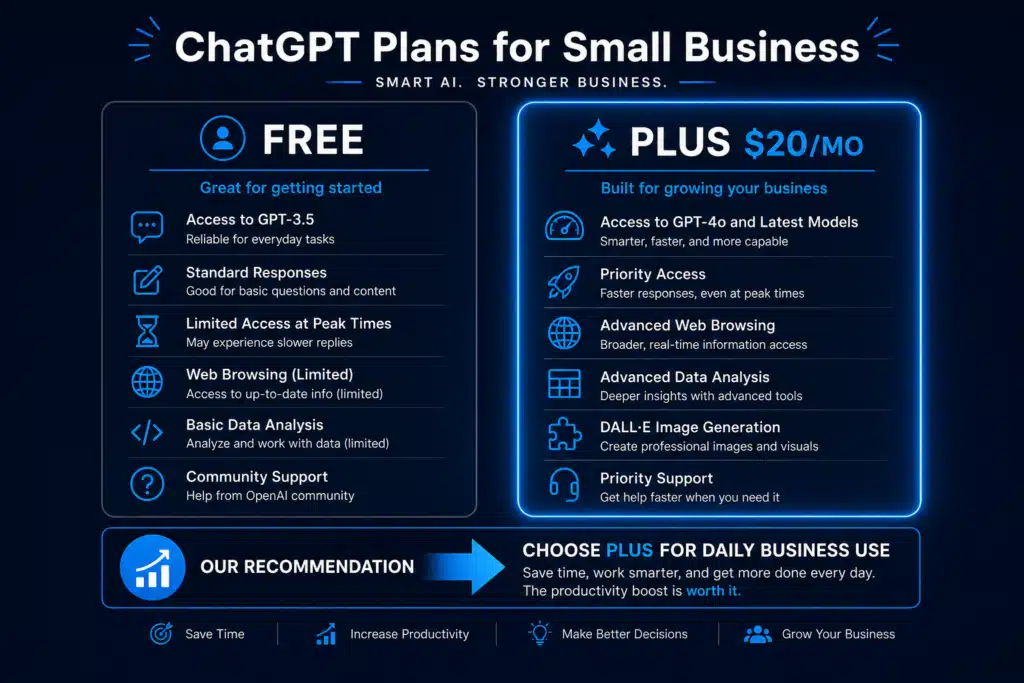
| Feature | Free (GPT-4o mini) | Plus ($20/month) |
|---|---|---|
| Basic conversations | ✅ | ✅ |
| Latest AI model (GPT-4o) | Limited | ✅ Full access |
| Image generation | Limited | ✅ |
| File uploads (PDFs, spreadsheets) | Limited | ✅ |
| Custom GPTs (saved workflows) | Limited | ✅ |
| Priority during busy times | ❌ May get queued | ✅ Always available |
| Web browsing | Limited | ✅ |
My recommendation: Start with the free version for 1 to 2 weeks. If you find yourself using it daily (most business owners do), upgrade to Plus. At $20/month, it’s cheaper than one hour of most professionals’ time — and it’ll save you dozens of hours.
Setting Up in 5 Minutes
- Go to chat.openai.com
- Click “Sign Up” — use your business email (keeps things organized)
- Verify your email and set a password
- Skip the tour if you want — you’ll learn by doing
- Type your first message in the text box at the bottom
That’s it. No software to install, no downloads, no IT department needed. It works in your web browser on any computer, tablet, or phone. There’s also a mobile app for iOS and Android if you prefer that.
The One Concept That Changes Everything
Here’s the single most important thing to understand about ChatGPT: the quality of what you get out depends entirely on what you put in.
A vague request gets a vague answer. A specific request gets a specific, useful answer.
Bad prompt: “Write me a marketing email.”
Result: Generic, unusable fluff that sounds like it was written by a robot.
Good prompt: “You are an email marketer for a residential plumbing company in Austin, TX. Write a promotional email for our $99 summer AC tune-up special. Target homeowners aged 30 to 55. Keep it under 150 words, use a friendly but professional tone, and end with a clear call to action to book online.”
Result: A ready-to-send email that sounds like you wrote it.
The difference? Context. The more context you give, the better the output. Think of it like giving instructions to a new employee — you wouldn’t just say “do marketing.” You’d explain who your customers are, what you’re promoting, and how you want it to sound.
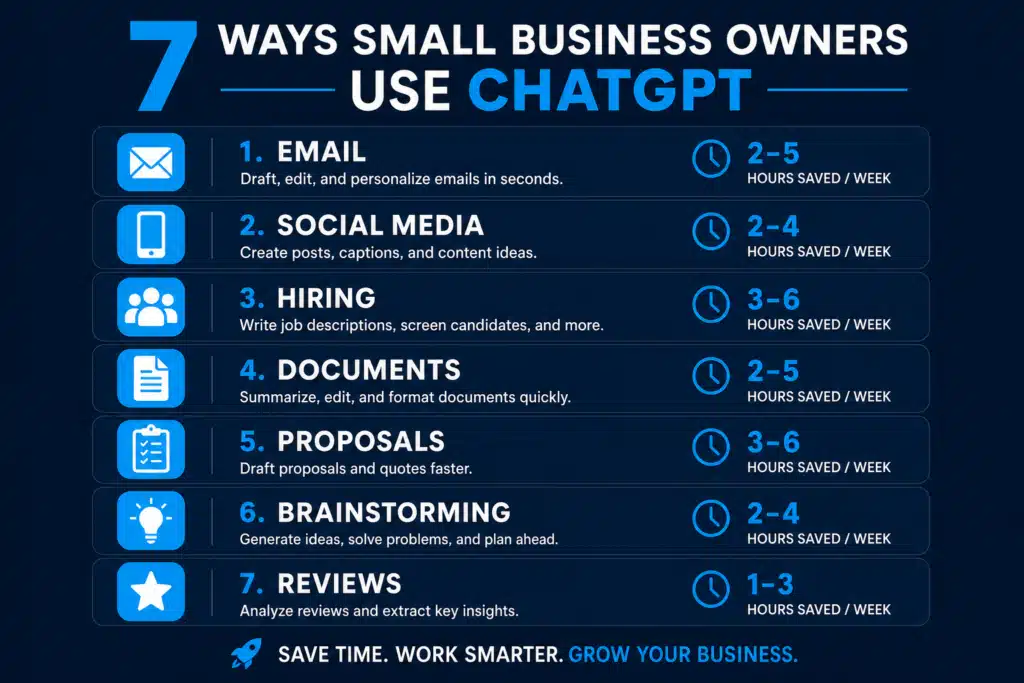
7 Ways to Use ChatGPT in Your Business Today
1. Draft Customer Emails in Seconds
Instead of staring at a blank screen for 15 minutes composing a response, paste the customer’s email into ChatGPT and say: “Draft a professional, friendly reply to this customer email. My business is [your business]. Address their concern and offer [your solution].”
Time saved: 10 to 15 minutes per email. If you write 5 customer emails per day, that’s over an hour saved daily.
2. Create Social Media Content for the Week
Tell ChatGPT your business type, your audience, and what platforms you use. Ask it to create a week’s worth of posts with captions, hashtags, and image suggestions. Review, edit any that need your personal touch, and schedule them.
Time saved: 2 to 3 hours per week on content creation.
3. Write Job Descriptions and Interview Questions
Hiring? Give ChatGPT the role title, your business context, and what you’re looking for. It’ll draft a professional job description in 30 seconds that would take you 45 minutes to write from scratch. Follow up with “Now give me 10 interview questions for this role with notes on what a good answer looks like.”
Time saved: 1 to 2 hours per hire.
4. Summarize Long Documents
Got a 30-page contract, a vendor proposal, or an insurance policy renewal? Upload the PDF to ChatGPT (Plus required) and ask: “Summarize this document in bullet points. Highlight any terms I should be concerned about and any deadlines.”
Time saved: 30 to 60 minutes per document.
5. Generate Estimates and Proposals
Describe the project scope, your pricing, and the client’s situation. ChatGPT will draft a professional proposal with sections for scope, timeline, pricing, and terms. You review, adjust the numbers, and send. What used to take an hour now takes 10 minutes.
Time saved: 45 to 60 minutes per proposal.
6. Brainstorm Business Ideas and Solutions
Stuck on a problem? Use ChatGPT as a thinking partner. “I run a [business type] and I’m struggling with [specific problem]. Give me 10 creative solutions I haven’t thought of.” It won’t always be right, but it’ll surface ideas you wouldn’t have considered.
Value: Priceless when you’re a solo owner with no one to bounce ideas off.
7. Respond to Online Reviews
Paste any Google, Yelp, or Facebook review into ChatGPT and ask it to draft a response. For positive reviews: personalized thank-yous that mention specifics. For negative reviews: empathetic, professional responses that take the conversation offline. You’ll respond to every review in a fraction of the time.
Time saved: 5 to 10 minutes per review response.
5 Mistakes to Avoid as a Beginner
- Don’t publish AI output without reading it. ChatGPT is a first-draft machine. Always review, fact-check, and add your personal voice before sending anything to a customer.
- Don’t share sensitive business data carelessly. Avoid pasting customer credit card numbers, Social Security numbers, or highly confidential contracts. General business information is fine.
- Don’t expect perfection on the first try. If the output isn’t right, tell ChatGPT what to fix: “Make it shorter,” “Sound more casual,” “Add specific pricing.” It’s a conversation, not a one-shot.
- Don’t try to automate everything at once. Pick one or two tasks from the list above. Get comfortable. Then expand.
- Don’t forget to save your best prompts. When you get a prompt that produces great results, save it in a document. These become your reusable templates — your AI playbook.
What About Claude, Gemini, and Other AI Tools?
ChatGPT isn’t the only option. Here’s a quick comparison:
| Tool | Best For | Price | Notes |
|---|---|---|---|
| ChatGPT | All-around best starter | Free / $20 mo | Largest ecosystem, most plugins |
| Claude (Anthropic) | Long documents, nuanced writing | Free / $20 mo | Excellent for detailed analysis |
| Gemini (Google) | Research, Google integration | Free / $20 mo | Built into Google Workspace |
| Microsoft Copilot | Office documents | Free / $30 mo | Best if you live in Word/Excel |
The honest truth: they’re all good. For most small business owners, ChatGPT is the best starting point because it has the largest user community, the most tutorials, and the easiest learning curve. You can always try others later.
Your First Week Action Plan
- ☐ Day 1: Create your free ChatGPT account
- ☐ Day 2: Draft 3 customer emails using ChatGPT
- ☐ Day 3: Generate this week’s social media content
- ☐ Day 4: Summarize one document (contract, proposal, etc.)
- ☐ Day 5: Respond to 3 online reviews with AI-drafted responses
- ☐ Weekend: Save your best prompts in a document for reuse
By the end of week one, you’ll have a clear picture of how ChatGPT fits into your daily workflow — and you’ll wonder how you managed without it.
Want the Full Prompt Library and Strategy Guide?
This post gets you started. But if you want 40+ tested business prompts, advanced strategies for maximizing AI output, and a complete system for building AI into your business, the AI Profit Bundle has it all.
Four expert guides — strategies, prompts, mistakes to avoid, and fail-proof workflows — for just $27.
👉 Get the AI Profit Bundle → $27
Your AI journey starts with one conversation. Make it count.
Interested in learning more about prompts? Check out 40+ AI Prompts for Small Business Owners