
How to Automate Your Small Business with AI — A Proven 90-Day Roadmap
If you’ve been wondering how to automate your small business with AI but don’t know where to start, you’re not alone. According to the 2026 Intuit QuickBooks AI Impact Report — based on over 34,000 survey responses — 77% of small businesses now use AI regularly, up from 48% just 18 months ago. But here’s the gap: most owners are still only scratching the surface with one or two tools.
This post gives you a complete 90-day plan to go from “curious” to “automated.” No jargon, no fluff — just a proven timeline with specific tasks, tools, and benchmarks for each phase.
Why Now? The Numbers That Changed in 2026
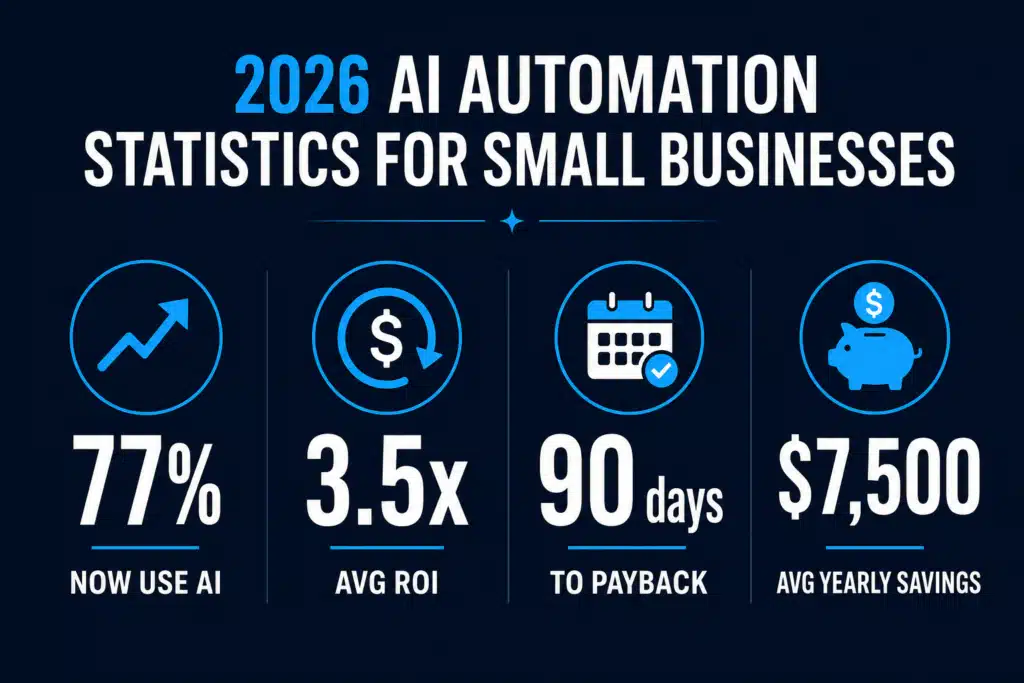
The case for automating isn’t theoretical anymore. Here’s what the latest research says:
- 77% of small businesses use AI regularly — up from 48% in late 2024 (Intuit QuickBooks, 34,000+ respondents)
- 85% of adopters see measurable ROI (Salesforce SMB Trends, 3,350 respondents across 26 countries)
- 3.5x average return on investment — with customer service and marketing automation leading the way (Upcode AI Report 2026)
- 30 to 90 day payback period — most businesses break even within the first quarter (SBE Council 2026)
- $7,500 average annual savings from AI workflow automation, with 25% of adopters saving over $20,000/year
The businesses seeing the best results aren’t the ones with the biggest budgets. They’re the ones with a plan. That’s what this roadmap gives you.
Phase 1: Days 1–30 — Audit, Choose, and Quick Win
The first month isn’t about installing every AI tool you can find. It’s about understanding where your time actually goes and picking one high-impact area to automate first.
Week 1: Time Audit
Track every task you do for five business days. Write down:
- What the task is
- How long it takes
- Whether it’s repetitive (yes/no)
- Whether it requires your personal judgment (yes/no)
Any task that’s repetitive and doesn’t require your personal judgment is an automation candidate. Most owners find 10–15 hours per week of tasks in this category.
Week 2: Pick Your First Automation Target
Choose the task that scores highest on two criteria: time consumed and ease of automation. For most small businesses, that’s one of these five:
- Email responses — drafting replies to common customer questions
- Social media content — writing captions and scheduling posts
- Invoice and receipt processing — extracting data from documents
- Appointment scheduling — back-and-forth booking messages
- Lead follow-up — initial outreach and qualification messages
Weeks 3–4: Implement Your First Tool
Set up one AI tool for your chosen task. Don’t overcomplicate it — you’re going for a quick win that builds momentum. Popular starting points:
- Email: ChatGPT or Claude for drafting templates, then set up canned responses
- Social media: Buffer or Hootsuite with AI caption generation
- Documents: QuickBooks AI or Dext for receipt scanning
- Scheduling: Calendly or Acuity with automated confirmation flows
- Lead follow-up: GoHighLevel or HubSpot with AI-assisted sequences
Month 1 goal: Save 2–4 hours per week on one task. That’s your proof of concept.
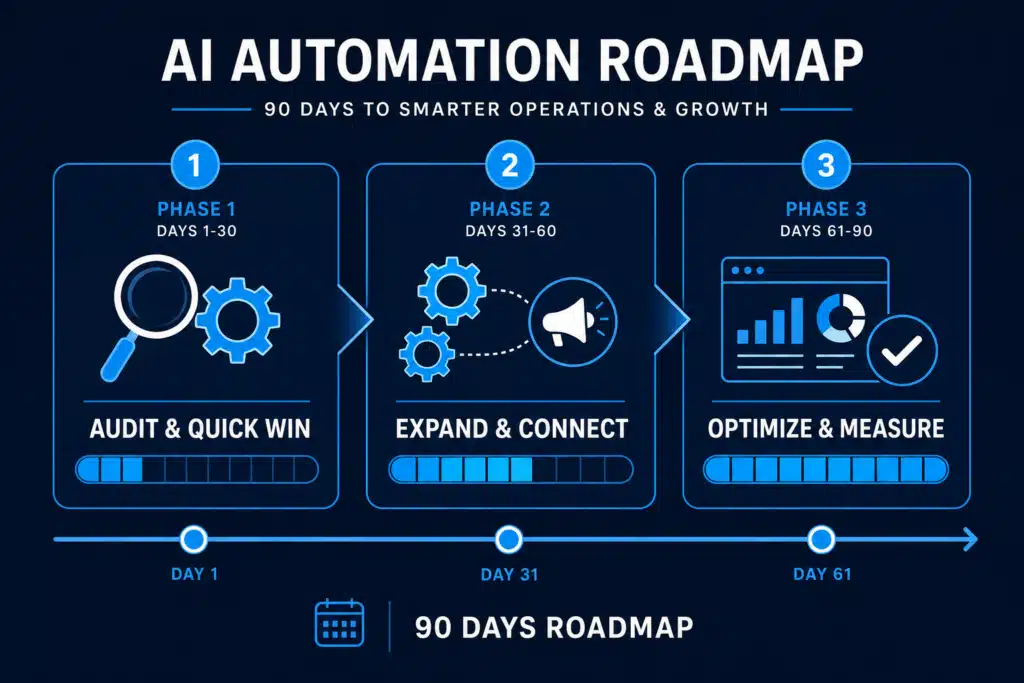
Phase 2: Days 31–60 — Expand and Connect
Now that you’ve proven the concept with one automation, it’s time to add two more and start connecting them.
Week 5–6: Add Marketing Automation
Marketing is where most small businesses see the biggest time savings. Set up:
- Content creation pipeline: Use AI to draft blog posts, emails, and social content. You edit and approve — the AI does the heavy lifting.
- Email sequences: Build a 5-email welcome sequence for new leads. Tools like Mailchimp, ConvertKit, or GoHighLevel can trigger these automatically.
- Ad copy testing: Use AI to generate 3–5 headline variations for any ad campaign, then let performance data pick the winner.
Week 7–8: Add Customer Service Automation
Customer service automation doesn’t mean replacing the human touch — it means handling the repetitive 80% so you can give better attention to the 20% that matters.
- FAQ chatbot: Set up a simple chatbot on your website that handles the top 10 questions you get asked. Tools: Tidio, Intercom, or Drift.
- Review response templates: Use AI to draft personalized responses to Google and Yelp reviews in seconds instead of minutes.
- Ticket routing: If you get support emails, use AI to categorize and prioritize them automatically.
Month 2 goal: Save 6–10 hours per week across three automated areas. Start seeing the compound effect.
Phase 3: Days 61–90 — Optimize and Measure
The final month is about refinement. You’ve got the systems running — now make them better.
Week 9–10: Measure What’s Working
Track three numbers for each automation:
- Time saved per week (compare to your Week 1 audit)
- Quality output (are customers noticing? Are leads converting?)
- Cost (monthly tool subscriptions vs. time saved at your hourly rate)
Most owners find their AI tools pay for themselves 3–5x over when they do this math. If a tool costs $50/month but saves you 8 hours, and your time is worth $75/hour, that’s $600 in value for $50 spent.
Week 11–12: Refine and Add Advanced Automations
Based on your data, double down on what’s working and cut what isn’t. Advanced moves for Month 3:
- Connect your tools: Use Zapier or Make to link your CRM, email, calendar, and invoicing so data flows automatically between them.
- Build custom prompts: Create a library of tested AI prompts specific to your business. These become reusable assets that save time every single day.
- Delegate to your team: If you have employees, train them on the AI tools you’ve validated. A 15-minute walkthrough can save your team dozens of hours monthly.
Month 3 goal: Save 12–15+ hours per week. Calculate your total ROI and plan your next quarter of automation.
The Tools That Actually Work in 2026
You don’t need 20 tools. Here’s a lean stack that covers the essentials:
| Category | Recommended Tool | Monthly Cost | Best For |
|---|---|---|---|
| AI Assistant | ChatGPT Plus or Claude Pro | $20 | Content, emails, research |
| Email Marketing | ConvertKit or Mailchimp | $0–$29 | Sequences, newsletters |
| Social Media | Buffer or Hootsuite | $6–$99 | Scheduling, AI captions |
| CRM + Automation | GoHighLevel or HubSpot | $97–$0 | Lead management, workflows |
| Workflow Connector | Zapier or Make | $0–$20 | Connecting all your tools |
| Customer Service | Tidio or Intercom | $0–$39 | Chatbot, live chat |
Total investment: $50–$200/month depending on your stack. Compare that to $7,500+ in average annual savings and the math is clear.
Common Mistakes to Avoid
- Automating everything at once. Start with one task. Build momentum. Expand from there.
- Skipping the time audit. If you don’t know where your time goes, you’ll automate the wrong things.
- Choosing tools before choosing problems. The tool should fit the task — not the other way around.
- Never checking the output. AI is a first draft machine, not a finished product machine. Always review.
- Ignoring your team. If your employees don’t know how to use the tools, the automation dies when you’re not looking.
Your Quick-Start Checklist
Print this out or screenshot it. This is your week-by-week guide:
- ☐ Week 1: Complete your 5-day time audit
- ☐ Week 2: Pick your #1 automation target
- ☐ Week 3–4: Set up and test your first AI tool
- ☐ Week 5–6: Add marketing automation
- ☐ Week 7–8: Add customer service automation
- ☐ Week 9–10: Measure time saved, quality, and cost
- ☐ Week 11–12: Connect tools, build prompt library, train team
Questions Owners Ask About Automating With AI
How do I automate my business with AI if I have no technical background?
Start with one task you do more than five times a week, and automate only that. In practice that means: pick the task, write down the exact steps you take today, then hand those steps to an AI tool as instructions. No code. The owners who stall are the ones who try to map the whole business first. Automate the quote follow-up or the appointment reminder, run it for two weeks, then pick the next one. Three automations done beats thirty planned.
How do I use AI to automate business processes without breaking what already works?
Run the automation in parallel before you trust it. For two weeks, let the AI draft the follow-up and you send it — you keep the veto. You will catch the two or three cases where it gets the tone or a price wrong, fix the instructions, and only then let it send on its own. The failure mode is not AI making mistakes; it is nobody noticing for a month because the automation was switched on and forgotten.
What business processes should I automate first?
In order of payback for a small service business: appointment reminders and confirmations, quote and estimate follow-up, review requests after a completed job, inbound call answering, and invoice or payment chasing. Every one of those is repetitive, has a clear right answer, and costs you money each time it slips. Leave anything requiring judgment — pricing a complicated job, handling an angry customer, hiring — alone for now.
What does AI process automation cost a small business?
Less than most owners assume, which is why the real cost is your attention, not the subscription. A realistic first-year stack is $20–$30/month for a general AI assistant, $0–$40/month for the automation features already sitting inside software you pay for, and $30–$150/month if you add a dedicated reminder or receptionist tool. Check what your existing field service or CRM software already includes before you buy anything new — a surprising number of shops pay twice for the same feature.
How long before automation actually saves me time?
Each individual automation takes one to three hours to set up and starts paying back inside two weeks. What takes longer is the habit. Expect to spend the first month building three or four automations and the second month noticing which ones you now rely on. If you have not felt the difference after 60 days, you automated the wrong tasks — go back and pick ones tied to money slipping through, not ones that were merely annoying.
Will AI automation replace my staff?
Not at your size. What it replaces is the unpaid second shift — the hour you spend at 9pm sending reminders and chasing quotes. For a shop with a few employees, automation usually means the person answering the phone stops doing data entry, not that you need one fewer person. If you are a solo operator, it is the difference between taking on more work and turning it away.
Ready to Shortcut the Learning Curve?
This roadmap gives you the structure. But if you want the actual prompts, strategies, and step-by-step playbooks to execute each phase faster, the AI Profit Bundle has everything you need.
Four expert guides — covering AI profit strategies, business prompts, common mistakes to avoid, and a system for building fail-proof AI workflows — all for just $27.
👉 Get the AI Profit Bundle → $27
.Start automating smarter today. Your 90-day transformation begins now.
For more great reading, check out ChatGPT for Small Business Owners: 7 Free vs. Paid Methods