
Your 90-Day AI Implementation Plan for Small Business — Week by Week
Most small businesses that try AI fail within 60 days — not because the tools don’t work, but because they have no plan. They sign up for ChatGPT, play with it for a week, and quietly forget about it. Meanwhile, their competitors who follow a structured AI implementation plan for small business are saving 10-15 hours a week and growing faster.
This guide is the plan those competitors are following. It’s a week-by-week, task-by-task roadmap that takes you from “AI-curious” to “AI-automated” in 90 days. No coding. No data science degree. No enterprise budget. Just methodical implementation that compounds over three months.
Print this page. Block time on your calendar. And follow the plan.
Why 90 Days? The Science Behind This AI Implementation Plan for Small Business
Ninety days isn’t arbitrary. Research from behavioral psychology shows that new habits take 66 days on average to become automatic. A Harvard Business Review study found that small businesses with structured AI rollout plans were 3x more likely to still be using AI tools after 6 months compared to those who adopted tools ad hoc. Building an extra month of buffer accounts for learning curves, tool adjustments, and the inevitable week where you’re too busy to focus on implementation.
This AI implementation plan for small business is structured in three phases that mirror how technology adoption actually works:
- Phase 1 (Weeks 1-4): Foundation — Audit your current processes, select tools, and implement your first AI workflow
- Phase 2 (Weeks 5-8): Automation — Expand AI into marketing, customer service, and operations
- Phase 3 (Weeks 9-12): Optimization — Refine, measure ROI, and build systems that run without your daily involvement
By the end of 90 days, you’ll have 5-8 AI-powered workflows running across your business, a clear picture of your ROI, and the confidence to identify new automation opportunities on your own.
Before You Start: 3 Prerequisites
Before diving into this AI implementation plan for small business, set these three foundations:
1. Define Your “North Star” Metric
What’s the single most important outcome you want from AI? More leads? Fewer hours on admin? Better customer response time? Pick one primary metric and 2-3 secondary ones. Write them down. You’ll reference these every week to ensure your implementation stays focused.
2. Block Weekly Implementation Time
This plan requires 3-5 hours per week of dedicated implementation work. Block it on your calendar now — Friday mornings work well for most business owners. Treat this time as non-negotiable. Random “I’ll get to it” approaches fail 90% of the time.
3. Set Your Budget
A realistic AI tool budget for a small business is $100-$300/month. That covers 3-5 core tools. You can start with less (ChatGPT Plus at $20/month is a solid foundation), but plan to scale as you validate results. If you need help calculating whether AI is worth the investment, our AI ROI guide walks through the math.

Phase 1: Foundation (Weeks 1-4)
Week 1: The AI Audit
This is the most important week in your entire AI implementation plan for small business. Get this right and everything else flows; skip it and you’ll waste time automating the wrong things.
Task 1: Time Tracking (2 hours)
For 5 business days, track every task you and your team perform. Use a simple spreadsheet: task name, time spent, how often it repeats, and how painful it is (1-5 scale). Don’t overthink this — a rough log is infinitely better than no log.
Task 2: Process Mapping (1 hour)
Identify your 10 most time-consuming recurring tasks. For each one, answer: Is it repetitive? Is there a clear right/wrong output? Does it involve text, numbers, or scheduling? Tasks that score “yes” on all three are your prime AI candidates.
Task 3: Quick Wins List (30 minutes)
From your top 10, pick the 3 tasks that are: easiest to automate, would save the most time, and have the lowest risk if AI makes a mistake. These are your Phase 1 targets. Common winners: email drafting, social media posting, appointment scheduling, and invoice generation.
Week 2: Tool Selection and Setup
Task 1: Choose Your Core Tools (1 hour)
Based on your quick wins list, select 2-3 tools. Here’s a starter recommendation based on the most common quick wins:
- For content/email: ChatGPT Plus ($20/month) or Claude Pro ($20/month)
- For automation: Zapier ($29/month) or Make.com ($9/month)
- For scheduling: Calendly with AI ($12/month) or Acuity
Task 2: Account Setup (1 hour)
Sign up for free trials or paid plans. Don’t spend more than 20 minutes per tool on initial setup — you’ll refine settings in Week 3. The goal is to have accounts active and accessible.
Task 3: First Automation (1.5 hours)
Pick your easiest quick win and build your first AI workflow. If it’s email drafting: open ChatGPT, paste one of the AI prompt templates from our library, customize it for your business, and draft 5 real emails. Measure time: how long did the old way take versus the AI-assisted way?
Week 3: Build and Test
Task 1: Refine Your First Automation (1 hour)
Your first week of using AI tools will surface friction points. Common issues: prompts that need tweaking, tool settings that need adjusting, or workflows that need reordering. Fix these now before they become habits.
Task 2: Build Automation #2 (2 hours)
Implement your second quick win. If Week 2 was content creation, make Week 3 about customer communication or scheduling. Diversifying early proves that AI works across your business, not just in one area.
Task 3: Create Your Prompt Library (1 hour)
Save every prompt that produces good results in a document organized by use case: marketing, customer service, operations, sales. This library becomes increasingly valuable over time — it’s your institutional knowledge for AI usage.
Week 4: Validate and Measure
Task 1: ROI Check (1 hour)
Compare your Week 1 time tracking against your current time allocation. Calculate: hours saved per week, quality of AI-assisted output versus manual, any costs incurred. If you’re saving 3+ hours per week on a $100/month tool investment, you’re on track.
Task 2: Build Automation #3 (1.5 hours)
Implement your third quick win. By the end of Week 4, you should have 3 AI workflows running consistently — enough to feel the cumulative time savings and build confidence for Phase 2.
Task 3: Phase 1 Review (30 minutes)
Answer honestly: Am I using these tools daily? Is the output quality acceptable? Am I saving real time? If the answer is “yes” to all three, move to Phase 2. If not, spend an extra week refining before advancing. A solid foundation matters more than speed.
Phase 2: Automation (Weeks 5-8)
Week 5: Marketing Automation
Now that your AI implementation plan for small business has a working foundation, it’s time to expand into your highest-ROI area: marketing.
Task 1: AI Content Workflow (2 hours)
Build a repeatable content creation workflow. Example: use AI to generate blog post outlines on Monday, draft posts on Tuesday, create social media posts on Wednesday, and schedule everything on Thursday. Our complete automation guide covers this workflow in detail.
Task 2: Email Marketing AI (1.5 hours)
Set up AI-assisted email campaigns. Most email platforms (Klaviyo, Mailchimp, ActiveCampaign) now include AI subject line generators, content suggestions, and send-time optimization. Enable these features and A/B test AI-generated subject lines against your manual ones.
Task 3: Social Media Scheduling (1 hour)
Batch-create one month of social media content using AI. Use the social media calendar prompt from our prompt guide, generate 30 posts, review and edit, then schedule everything in one session.
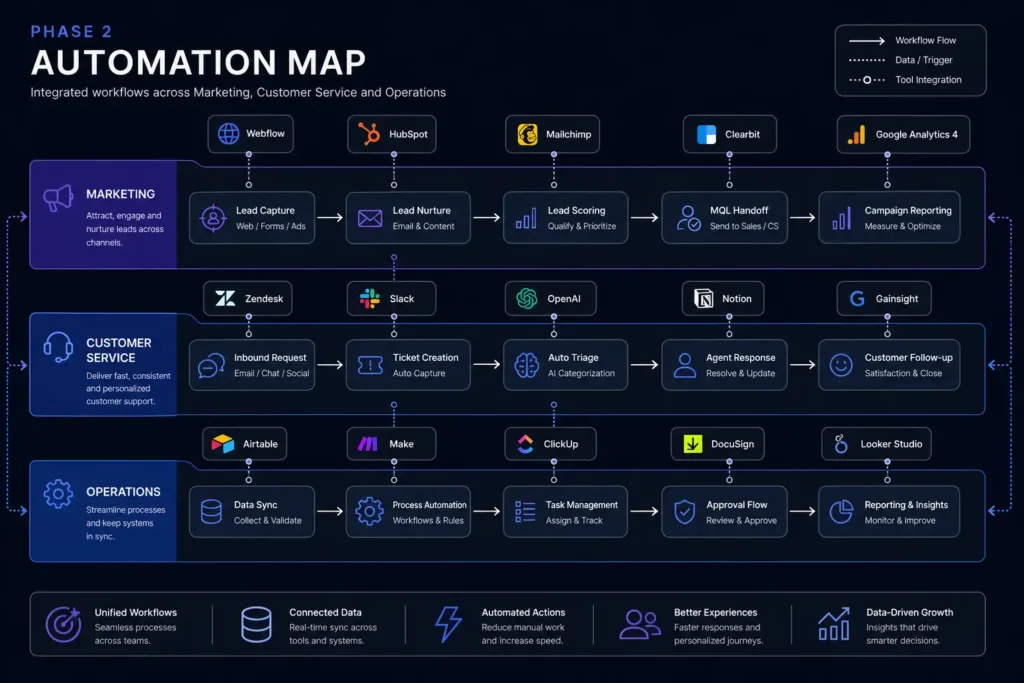
Week 6: Customer Service Automation
Task 1: AI Chatbot Setup (2 hours)
Install a chatbot on your website (Tidio, Intercom, or Drift). Configure it to handle: business hours/location questions, FAQ responses, appointment booking, and handoff to human for complex issues. See our guide on AI customer service without losing the personal touch.
Task 2: Response Templates (1.5 hours)
Use AI to create response templates for your 20 most common customer inquiries. Store these in your CRM or help desk tool. Train any team members on when to use templates versus personal responses.
Task 3: Review Management (30 minutes)
Set up AI-assisted review responses. When a new review appears, AI drafts a response; you review and personalize before posting. This ensures every review gets a response within 24 hours.
Week 7: Operations Automation
Task 1: Workflow Automation (2 hours)
Build 2-3 Zapier/Make automations connecting your existing tools. High-impact examples: new lead → CRM entry + welcome email + task assignment. Completed job → invoice generation + review request + follow-up scheduling. These multi-step automations eliminate the “I forgot to…” problem entirely.
Task 2: AI-Assisted Admin (1.5 hours)
Implement AI for your remaining admin tasks: meeting notes, data entry, report generation, or expense categorization. Our guide to AI admin automation covers the five highest-impact areas.
Task 3: Document Templates (1 hour)
Use AI to create/improve templates for: proposals, contracts, project briefs, and status reports. Good templates standardize quality and cut creation time by 70-80%.
Week 8: Integration and Flow
Task 1: Connect the Dots (2 hours)
Your AI tools shouldn’t work in isolation. Week 8 is about connecting them: chatbot leads flow into your CRM, content calendar feeds your email marketing, customer data informs your AI’s personalization. Map your data flow and plug the gaps.
Task 2: Team Training (1.5 hours)
If you have employees, Week 8 is training week. Show them every AI tool you’ve implemented, walk through the workflows, and create a simple one-page guide for each tool. Adoption fails when the team doesn’t understand the system.
Task 3: Phase 2 Review (30 minutes)
You should now have 6-8 AI workflows running across marketing, customer service, and operations. Measure total hours saved versus Phase 1 baseline. Most business owners are saving 8-12 hours per week by this point.
Phase 3: Optimization (Weeks 9-12)
Week 9: Performance Deep Dive
Phase 3 of your AI implementation plan for small business shifts focus from building to refining. This is where the compounding happens.
Task 1: Metrics Review (1.5 hours)
Pull data from every AI tool: email open rates, chatbot resolution rates, content engagement, time savings. Compare against your pre-AI baseline and your North Star metric. Identify which tools are delivering the highest ROI and which are underperforming.
Task 2: Prompt Optimization (1 hour)
Review your prompt library. Which prompts consistently produce good output on the first try? Which need multiple iterations? Refine the underperformers — add more context, change the output format, or try a different AI model. Small prompt improvements compound over hundreds of uses.
Task 3: Cost-Benefit Analysis (30 minutes)
Calculate your total AI tool spend versus total value generated (time saved × hourly value + revenue attributed to AI-assisted marketing). Most businesses see 5-10x ROI by Week 9. If yours is lower, evaluate which tools aren’t earning their keep.

Week 10: Advanced Automations
Task 1: Multi-Step Workflows (2 hours)
Build the complex automations you’ve been putting off. Examples: customer purchases → triggers personalized email sequence → schedules follow-up call at day 30 → generates review request at day 45. These “set and forget” workflows are where AI implementation truly transforms a business.
Task 2: AI-Powered Analytics (1 hour)
Set up AI dashboards that surface insights you’d otherwise miss. Tools like Google Analytics 4 with AI summaries, ChatGPT for analyzing spreadsheet data, or industry-specific analytics platforms. The goal: spend 30 minutes per week reviewing AI-curated insights instead of 3 hours crunching numbers manually.
Task 3: Personalization Layer (1 hour)
Add personalization to your customer-facing AI. Train your chatbot on recent customer feedback. Segment your email list using AI-identified patterns. Customize your website messaging based on visitor behavior. Personalization is the difference between AI that feels robotic and AI that feels helpful.
Week 11: Systematize and Document
Task 1: Create Your AI Playbook (2 hours)
Document every AI workflow, tool login, prompt library, and automation you’ve built. This playbook protects your business: if you’re sick for a week, can someone else run these systems? If you hire someone, can they onboard in a day? Good documentation turns personal knowledge into business infrastructure.
Task 2: Contingency Planning (1 hour)
What happens if a tool goes down? If a chatbot gives a wrong answer? If an automation sends the wrong email? Build simple contingency plans for your 5 most critical AI workflows. Include: who gets notified, how to switch to manual mode, and how to fix the issue.
Task 3: Future Roadmap (1 hour)
List the next 5-10 AI opportunities you’ve identified during this 90-day implementation. Prioritize them by expected ROI and complexity. This becomes your Quarter 2 AI implementation plan for small business operations.
Week 12: Measure, Celebrate, and Plan
Task 1: 90-Day Results Report (1.5 hours)
Compile your final metrics: total hours saved per week, total cost of AI tools, revenue impact, customer satisfaction changes, and team feedback. Write a one-page summary. You’ll use this to justify continued investment and to benchmark your next 90 days.
Task 2: Celebrate Wins (30 minutes)
Seriously — acknowledge what you’ve accomplished. In 90 days you’ve built an AI-augmented business that would have taken an enterprise team months to implement. Share results with your team, your mastermind group, or your accountability partner.
Task 3: Plan Quarter 2 (1 hour)
Using your future roadmap, plan your next 90 days. Most businesses focus on: deeper personalization, revenue-generating AI applications (dynamic pricing, lead scoring, upsell automation), and expanding AI usage to additional team members or departments.
How to Track Your AI Implementation Plan for Small Business Progress
Use this simple weekly tracker:
- Hours saved this week: [number] (compare to Week 1 baseline)
- AI tools used today: [list] (daily usage indicates real adoption)
- New automation built: [yes/no + description]
- Prompt library additions: [number of new prompts saved]
- Total monthly AI spend: $[amount]
- Biggest win this week: [one sentence]
- Biggest frustration: [one sentence + how you solved it]
Review this tracker every Friday afternoon. It takes 5 minutes and keeps your AI implementation plan for small business on track even during busy weeks.
5 Places Where AI Implementation Plans Stall
1. Week 2: Tool Paralysis. Too many options, too many comparisons, zero decisions. Fix: pick one tool per category, commit for 30 days, then evaluate. The best tool is the one you actually use.
2. Week 4: The “It’s Easier to Do It Myself” Trap. AI output requires editing, and editing feels slower than just writing it yourself. Fix: track time honestly. AI + editing is almost always faster than manual — but it doesn’t feel faster until you see the data.
3. Week 6: Team Resistance. Your employees see AI as a threat, not a tool. Fix: position AI as “your new assistant that handles the boring stuff so you can focus on the work that matters.” Show them their workflow improvement, not just yours.
4. Week 8: Integration Complexity. Connecting tools creates unexpected data flow issues. Fix: start with simple 2-tool integrations before building complex multi-step automations. Walk, then run.
5. Week 10: Plateau Feeling. The dramatic early gains level off and progress feels incremental. Fix: review your Week 1 baseline. You’re saving 10+ hours per week that you’ve already mentally reassigned — the improvement is invisible because you’ve adapted to it. That’s success, not stagnation.
After 90 Days: What Comes Next
Your first AI implementation plan for small business is complete, but the journey continues. Here’s what successful businesses focus on in months 4-6:
- Revenue-generating AI: Move from cost-saving automations to revenue-driving ones — dynamic pricing, predictive lead scoring, personalized upsell sequences
- AI-assisted strategy: Use AI for competitive analysis, market research, and business planning — not just execution
- Team scaling: Train every team member on AI tools relevant to their role; make AI literacy a hiring criterion
- Custom solutions: Once you’ve exhausted off-the-shelf tools, consider custom AI solutions for your specific industry workflows
The businesses that treat AI implementation as an ongoing practice — not a one-time project — are the ones building durable competitive advantages. As we discussed in our post on why 88% of small businesses have no AI strategy, having a plan is already a massive differentiator.
The Bottom Line
This AI implementation plan for small business works because it’s structured, sequential, and realistic. You’re not trying to transform your business overnight — you’re building one workflow at a time, measuring results at every stage, and letting the compound effect do the heavy lifting.
By Day 90, you’ll have: 6-8 AI workflows running daily, 10-15 hours per week recovered, a prompt library that makes AI consistently useful, and a clear picture of your ROI. Most importantly, you’ll have the skills and confidence to identify and implement new AI opportunities on your own.
The plan is here. The tools are ready. Your competitors are already on Week 3. The only thing between you and an AI-optimized business is 90 days of consistent implementation.
Start today. Start small. But start.
Need ready-to-use prompts, checklists, and ROI calculators for your 90-day plan? Our AI Profit Levers Bundle has everything you need to accelerate your implementation — including the exact templates referenced throughout this guide. Get the bundle for $27 →