
AI Appointment Reminders for Plumbers: Cut No-Shows by 70%
A no-show is worse than a slow day. You blocked two hours, drove across town, burned $18 in fuel, and turned away another call to protect the slot. Then nobody answers the door. The customer forgot, or their kid got sick, or they booked a second plumber as insurance and the other guy got there first.
AI appointment reminders for plumbers fix most of that with a text message. Not a fancy one — a short, automatic message at the right moment that makes the customer confirm, reschedule, or cancel while you can still fill the slot. Shops that run a proper reminder sequence routinely cut no-shows by half or better.
This guide covers the exact message sequence, what to send and when, what the tools cost, the TCPA rules you cannot ignore, and how to measure whether it is working.
What a No-Show Actually Costs
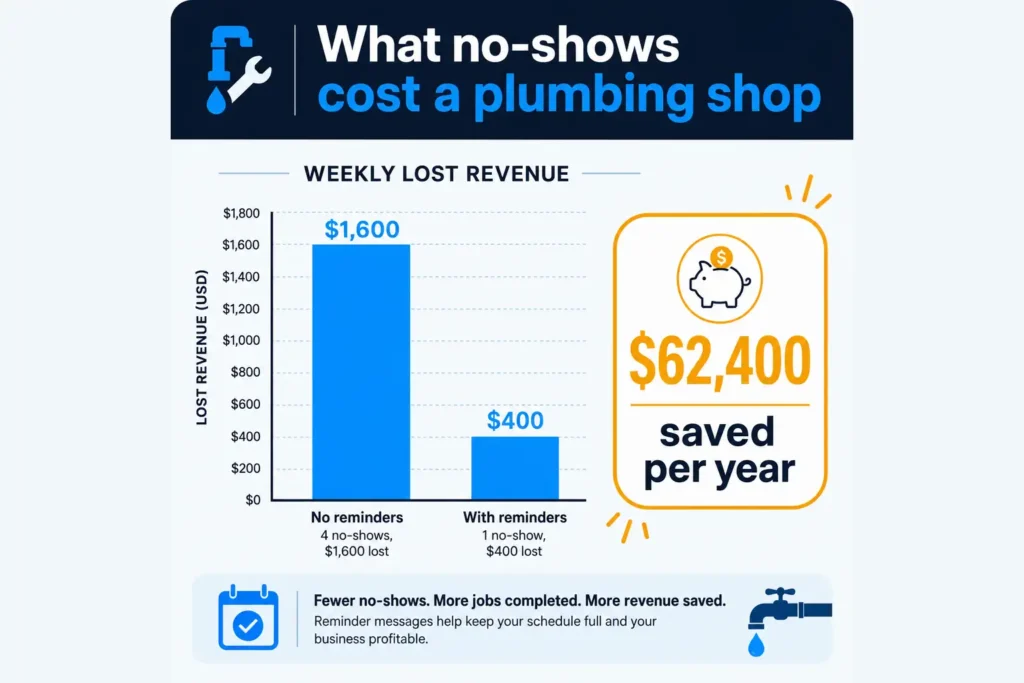
Most owners underestimate this because they only count the lost ticket. The real cost has four parts:
| Cost component | Per no-show |
|---|---|
| Lost job revenue (average ticket) | $400 |
| Windshield time and fuel | $45 |
| Tech labor for the wasted block | $70 |
| Opportunity cost of the turned-away call | Varies — often another $400 |
| Realistic total | $500+ |
Run it forward. A shop doing 30 jobs a week at a 12% no-show rate loses about 3.6 slots a week. At $500 each, that is roughly $93,600 a year. Cut the rate to 4% and you claw back around $62,000 of it. The software to do that costs $30 to $150 a month.
That gap is why reminders are the highest-ROI automation in a home service business — higher than marketing, because you are not buying new demand, you are keeping demand you already paid to acquire.
The 4-Touch Reminder Sequence That Works

Most shops send one reminder the day before and call it done. That is leaving money on the table. Four touches is the pattern that performs:
Touch 1 — Instant confirmation, sent within 60 seconds of booking. This is the most-read message you will ever send, because the customer is still holding the phone. Include the date, the arrival window, the trip fee, and your business name.
Hi {first name} - {business name} here. You're booked for
{day}, {date} between {window}. Trip fee is {amount}, applied
to the repair if you go ahead. Reply C to confirm or R to
reschedule. Reply STOP to opt out.
Touch 2 — 24 hours before. The workhorse message. This is where cancellations surface early enough that you can still refill the slot.
Reminder: {business name} is scheduled for tomorrow
{date}, {window}. Please make sure we can access the
{water heater / main shutoff / crawlspace}. Reply C to
confirm, R to reschedule.
Touch 3 — Morning of, with a real arrival window. This one prevents the “I waited all day and left” cancellation. If your dispatch software supports it, send an “on the way” text with the tech’s name.
Good morning {first name} - {tech name} is your plumber
today and will arrive between {tightened window}. He'll text
when he's 20 minutes out.
Touch 4 — After the job. Not a reminder, but it belongs in the same automation: a thank-you plus a review request, sent two to three hours after completion while the relief is still fresh.
The reason four touches beats one is that no-shows have different causes. Touch 1 kills the “I booked two plumbers” problem. Touch 2 kills forgetting. Touch 3 kills impatience. Touch 4 is where the reviews come from.
Text, Email, or Voice?
Text is the default. SMS open rates run above 90% and most are read within minutes. Email reminders for a service appointment are close to useless — they land in Promotions and get read the following Tuesday.
Email is a backup copy, useful for the confirmation only, because it gives the customer something searchable with your address, license number, and cancellation policy.
Automated voice calls are for one case: the customer with no mobile number, usually an older homeowner on a landline. Keep it as a fallback, not the primary.
One rule that matters more than the channel: make replies work. If a customer texts back “can we do Thursday instead” and it disappears into a no-reply number, you have built a machine that annoys people. Either route replies to a real inbox or use a tool that handles rescheduling conversationally.
The TCPA Rules You Cannot Ignore
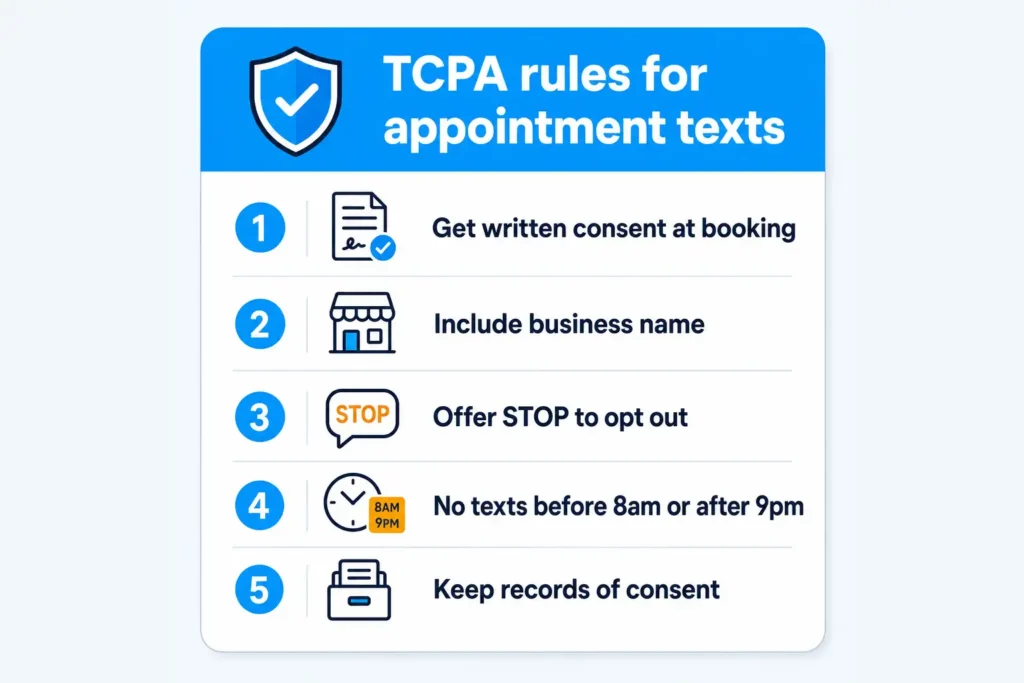
This is the part vendors gloss over, and it is the part that carries statutory damages of $500 to $1,500 per message. Appointment reminders are treated far more favorably than marketing texts — but only if you keep them separate.
Get consent at booking and write it down. “Is it okay if we text you about this appointment?” plus a note in the customer record. If you take bookings through a web form, a checkbox with clear language does the job.
Keep transactional and promotional messages apart. A reminder about tomorrow’s appointment is transactional. “Spring drain special, 20% off” is marketing and needs express written consent. Bolting a promo onto the end of a reminder converts a safe message into a risky one.
Include your business name in every message. Identify yourself in the first message of every thread.
Honor STOP immediately and automatically. Any decent platform does this for you. Verify it actually works before you trust it — test it yourself.
Respect quiet hours. No texts before 8 a.m. or after 9 p.m. in the customer’s local time zone. Check your platform’s time zone setting, not your own.
Register your number for A2P 10DLC. Carriers now require business texting numbers to be registered, and unregistered traffic gets filtered silently. This is the single most common reason a shop says “our reminders stopped working” — the messages are being blocked, not ignored.
None of this is legal advice, and rules move. If you are texting at volume, spend an hour with an attorney once rather than guessing forever.
What AI Adds Beyond a Scheduled Text
A plain scheduled text already captures most of the value. Be honest about that before you pay for something fancier. What the AI layer genuinely adds:
It handles the reply. “Can you come Thursday afternoon instead?” gets read, matched against real availability, and rebooked without you touching it. That is the biggest single upgrade over dumb reminders.
It fills the hole. When someone cancels Tuesday’s 9 a.m., the system texts your waitlist and offers the slot to the next customer. A cancellation becomes a filled slot instead of a gap.
It adjusts timing. Better platforms learn that certain customers only reply in the evening and shift send times accordingly.
It flags the risky bookings. Customers who never confirm, who have no-showed before, or who booked far out are the ones to call personally. Let the system tell you which three to call instead of calling everyone.
It writes the messages. If your reminder texts sound robotic, generate them once with this prompt and paste them into your platform:
Write 4 SMS templates for a plumbing company's appointment
reminder sequence.

Business: {business name}
Tone: {friendly and direct / professional}
Trip fee: {amount}
Booking software: {tool}

Templates needed:
1. Instant booking confirmation
2. 24-hour-before reminder
3. Morning-of arrival window
4. Post-job thank you plus review request

Rules: under 300 characters each, business name in the first
message, include a reply-to-confirm option, include STOP
language in message 1 only, no marketing offers, use
{braces} for merge fields.
What It Costs
| Option | Monthly cost | Notes |
|---|---|---|
| Built into your field service software | $0–$40 add-on | Check first — Jobber, Housecall Pro and ServiceTitan all include some version |
| Standalone SMS reminder tool | $30–$80 | Good if your scheduler is Google Calendar |
| AI reminder platform with two-way rescheduling | $100–$250 | Worth it above roughly 25 jobs/week |
| Per-message carrier fees | ~$0.01 each | Plus a one-time 10DLC registration fee |
Start with what you already own. A surprising number of shops pay for a second reminder tool while the feature sits switched off inside the software they are already using. Check that before you buy anything.
Measuring Whether AI Appointment Reminders for Plumbers Are Working
Four numbers, checked monthly:
1. No-show rate. Your headline metric. Baseline it for four weeks before you turn reminders on, or you will never know what changed. Target: under 5%.
2. Confirmation reply rate. The percentage of customers who reply C or otherwise confirm. Above 60% is healthy. Below 30% usually means messages are being filtered — check your 10DLC registration.
3. Same-day cancellations vs advance cancellations. Reminders should shift cancellations earlier. An advance cancellation is a refillable slot; a same-day one is a dead one. If the ratio does not move, your 24-hour message is landing too late.
4. Refill rate on cancelled slots. Only relevant if you run a waitlist. Even a 30% refill rate on cancellations pays for the whole system.
Ignore vanity metrics like “messages sent.” The only thing that matters is whether the truck was busy.
Why AI Appointment Reminders for Plumbers Beat Calling Customers Yourself
Plenty of owners still do confirmation calls from the truck at the end of the day. It works — it is just the most expensive way to do it.
Calls take 4–6 minutes each including voicemails and callbacks. Thirty jobs a week is two to three hours of your evening, every week, forever. The same outcome by text costs you nothing after setup.
Most customers prefer not to talk. A confirmation call interrupts dinner and gets ignored. A text gets answered from the couch in four seconds.
You forget when you are busy. And you are busiest exactly when no-shows hurt most — during a freeze, a storm week, or the summer AC rush. Automation does not have bad weeks.
Texts create a record. When a customer insists nobody told them about the trip fee, the confirmation thread settles it in five seconds. That alone has saved shops more than the subscription costs.
Keep the personal call for two situations: high-ticket jobs above a threshold you set, and customers the system flags as no-show risks. Those are worth your voice. The other 27 are not.
Common Questions
Will customers find it annoying? Four messages across a booking is normal now — it is what dentists, vets, and salons all do. Complaints come from frequency and from marketing bolted onto reminders, not from reminders themselves.
What about emergency calls booked for the same day? Skip the 24-hour touch and send only the confirmation and the arrival window. Most platforms let you set a different sequence for same-day jobs.
Should I charge a no-show fee? Only if you state it in the confirmation text and actually enforce it. An unenforced policy is just words. A stated $50 fee plus reminders works better than either alone.
Can I use my personal cell? No. Business texting needs a registered number, replies need to reach whoever is dispatching, and you do not want customers texting your personal line at 11 p.m. forever.
How long before I see a change? Four to six weeks, because you need enough completed jobs to compare. Do not judge it on two weeks of data.
How This Fits With the Rest of Your Phone System
Reminders are the back half of the booking process. The front half is making sure the call gets answered at all — covered in our guide to the AI receptionist for plumbers. Together they close the loop: every call answered, every booking confirmed, every gap refilled.
For the dispatch and routing side, see AI scheduling for plumbers. The same sequence works for heating and cooling work with the seasonal timing adjusted — see how HVAC companies use AI. For the follow-up messages and review requests around the job, AI customer service for small business goes deeper. And the AI prompts for small business owners pillar has the template library for everything else you write in a week.
The Bottom Line
AI appointment reminders for plumbers are the cheapest revenue you will ever recover. You are not chasing new customers — you are keeping the ones who already said yes. A shop losing three slots a week to no-shows is losing more money than most marketing budgets spend.
Do it in this order: check whether your existing software already does it, baseline your current no-show rate for four weeks, turn on the four-touch sequence, register for 10DLC, and test the STOP reply yourself. That is a two-hour project with a five-figure annual return.
The truck only makes money when someone is home. Reminders are how you make sure they are.
Want the rest of the automations that pay for themselves? The AI Profit Mastery Bundle gives you prompt templates, implementation checklists, and ROI calculators built for owner-operators — get it for $27 →